 How-to
How to Fix Neck Pain From Desk Work in 5 Steps
Quick Summary
Learning how to fix neck pain from desk work starts with your workstation: set chair height first, then desk height, monitor at eye level about an arm's length away, and keyboard close enough that elbows stay behind your hands. Pair these fixes with short desk-side neck exercises and micro-breaks every 20 to 30 minutes.
- Set chair height first, with feet flat and knees at roughly 90 degrees.
- Place the top of the monitor at or just below eye level, 20 to 30 inches away.
- Raise a laptop screen with a stand and use an external keyboard and mouse.
- Take a 30-second reset every 20 to 30 minutes: chin tucks, shoulder rolls, upper back extension.
- Get evaluated if neck pain lasts more than a few weeks or spreads into your arms.
Table of Contents
- Why Desk Work Strains Your Neck
- Step-by-Step: Fixing Your Workstation for Neck Pain Relief
- Step-by-Step Tech Neck Exercises to Do at Your Desk
- Next Step: Booking an Evaluation for Persistent Neck Pain
- Frequently Asked Questions
Why Desk Work Strains Your Neck
Last Updated: November 19, 2026
Learning how to fix neck pain from desk work is a common concern. Long hours hunched over a keyboard leave your neck stiff and sore by day's end, but most desk-related neck pain responds well to small, consistent changes. (Source: Occupational Safety and Health Administration guidelines)
Your head weighs about 10 to 12 pounds. When it drifts forward, your neck muscles work much harder to hold it up. That extra load builds tension fast.
Here is what usually causes the problem:
- Looking down at a laptop or phone for hours
- A monitor that sits too low or too far to one side
- A chair that pushes your shoulders forward
- Sitting in the same position all morning
A common mistake is blaming one bad posture when learning how to fix neck pain from desk work. In practice, it is the repeated pattern that wears the neck down over weeks and months.
Step-by-Step: Fixing Your Workstation for Neck Pain Relief
Most workstation advice stops at "raise your monitor." The useful version explains the measurements and the order to adjust things in, each step depends on the one before it.
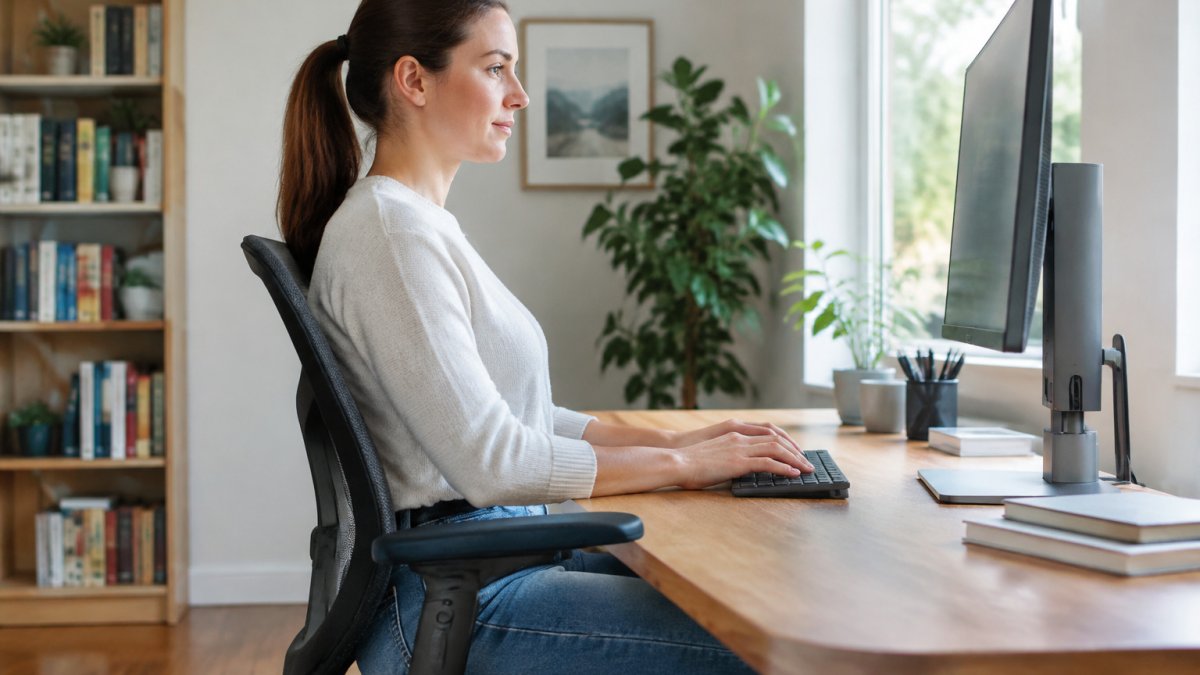
1. Set chair height first. Adjust the seat so your feet rest flat on the floor (or a footrest if your desk is fixed-height) and your knees sit at roughly 90 degrees, hips level with or slightly above the knees. If your feet dangle, add a footrest rather than lowering the seat, dangling feet round the lower back, which cascades upward into the neck.
2. Set desk height second. With the chair correct, your elbows should hang near your sides and bend to about 90 degrees, forearms roughly parallel to the floor. If your desk is too high, raise the chair and use the footrest; if it is too low, a keyboard tray is usually cheaper than a new desk.
3. Place the monitor third. The top of the screen should sit at or just below eye level, about an arm's length away, roughly 20 to 30 inches for most adults. Center it directly in front of you; a screen parked to one side keeps the neck rotated for hours.
4. Bring the keyboard and mouse close. If you have to reach forward to type, your shoulders roll forward and your head follows. Keep the keyboard close enough that your elbows stay behind your hands, and keep the mouse at the same height and distance.
5. Support the lower back. A lumbar support, built into the chair or a rolled towel, keeps the pelvis neutral so the upper back does not collapse. Shoulders should hang relaxed, not shrugged toward the ears.
Watch out: A laptop flat on the desk is the single most common cause of desk-related neck pain, because the screen and keyboard are fused at a height that forces you to look down. The fix is a laptop stand plus an external keyboard and mouse, raise the screen to eye level and drop your hands to desk height.
Laptop-only adjustments when you have no external gear:
- Prop the laptop on a stand or books and use the built-in keyboard only in short bursts, then switch to voice dictation or a tablet for reading.
- Tilt the screen back slightly rather than forward, a screen angled toward your face reduces how far you must drop your chin.
- Take a 30-second reset every 20 to 30 minutes: stand, roll the shoulders back, and re-level the head before the forward drift sets in. (Source: National Library of Medicine study)
People often fix the monitor and ignore the chair, or fix the chair and ignore the mouse. The neck responds to the whole chain, pelvis, upper back, shoulders, head, so adjust in order and re-check each setting after a week.
The workstation steps depend on each other, so here is the order to adjust them with the measurements the article gives.
| Step | What to adjust | Target measurement |
|---|---|---|
| 1. Chair height | Feet flat, knees bent | Knees about 90 degrees |
| 2. Desk height | Elbows and forearms | Elbows about 90 degrees |
| 3. Monitor | Top of screen and distance | Eye level, 20-30 inches away |
| 4. Keyboard and mouse | Reach | Elbows behind hands |
| 5. Lower back | Lumbar support | Pelvis neutral, shoulders relaxed |
Step-by-Step Tech Neck Exercises to Do at Your Desk
Tech neck is the forward-head posture that comes from screen use: the head drifts ahead of the shoulders, the deep neck flexors weaken, and the upper trapezius and levator scapulae tighten. The exercises below target both sides of that imbalance. Do them in order, mobility first, then activation, then a short strength hold.
Mobility (about 60 seconds):
- Chin tucks: Sit tall and glide your chin straight back, think "make a double chin," not "nod down." Hold 5 seconds, repeat 8 to 10 times. Chin tucks are a commonly recommended drill for forward head posture.
- Shoulder rolls: Roll the shoulders up, back, and down in slow circles, 10 reps, then reverse for 10. This offloads the upper trapezius.
- Gentle neck side bends: Tilt one ear toward the shoulder and hold 15 to 20 seconds per side. Keep the opposite shoulder down.
- Upper back extension: Interlace your fingers behind your head, keep the chin tucked, and gently lean back to open the chest. Hold 5 seconds, repeat 5 times.
Activation and strength (about 90 seconds):
- Wall angels: Stand with your back against a wall, arms bent at 90 degrees and pressed lightly into the wall. Slide the arms up and down slowly, 8 to 10 reps, keeping the lower back from arching.
- Isometric neck holds: Place your palm against your forehead and press your head gently into it without moving, hold 5 seconds, 5 reps. Repeat with the palm against each side of the head.
- Prone or seated Y-raise: With light or no weight, raise the arms into a Y shape and squeeze the shoulder blades down and together, 8 to 10 reps.
The micro-break routine that actually fits a workday:
Most advice says "take breaks," which is too vague to follow. Use a 30-second desk-side reset every 20 to 30 minutes: chin tuck for 5 seconds, 10 shoulder rolls, and a 5-second upper back extension. Set a recurring calendar reminder. Short, frequent breaks are generally easier to maintain than one long stretch session.
Dosage and progression:
- Weeks 1-2: mobility only, once per hour, plus the 30-second reset.
- Weeks 3-4: add the activation and strength moves, twice per day.
- Week 5 onward: add light resistance to the Y-raise and wall angels, and hold chin tucks for 10 seconds.
Watch out: Pushing into pain or forcing end-range neck rotation can aggravate the joints; stay within a comfortable range and stop any move that produces arm tingling, numbness, or dizziness. If those symptoms appear, get evaluated rather than stretching through it.
Long-term habit tracking:
Next Step: Booking an Evaluation for Persistent Neck Pain
If your neck pain lasts more than a few weeks, or it spreads into your arms or causes headaches, a professional evaluation is a smart next step. A qualified healthcare professional can evaluate what is driving your pain. Book an appointment to start that conversation.
Frequently Asked Questions
How do I get rid of neck pain from a desk job?
Start by raising your monitor so the top of the screen sits at or just below eye level, and keep your elbows near 90 degrees with forearms supported. Take a short movement break every 30 to 60 minutes to change position. Gentle chin tucks and shoulder rolls done at your desk may help with tension for some people. If pain persists beyond a few weeks, or radiates into the arms or causes numbness, schedule an evaluation with a qualified healthcare professional rather than relying on self-care alone.
Will tech neck ever go away?
Many cases of tech neck improve once posture habits change and the neck gets regular movement and strengthening. Improvement usually takes consistent effort over weeks rather than a single fix. Ongoing pain, pain that worsens, or symptoms that interfere with sleep or work are reasons to see a healthcare professional for an individual assessment, since the right approach depends on the underlying cause.
What can I do to prevent neck pain when sitting at a desk?
Prevention comes down to a neutral workstation and regular movement. Keep the screen at eye level, keep your back supported with feet flat on the floor, and avoid craning forward toward a laptop by using an external monitor or stand. Set a reminder to stand, stretch, or walk briefly every hour. Small, repeated adjustments tend to matter more than one perfect chair.